
Blog·Social Media
Social Media Content Calendar on Autopilot: 30 Days in 30 Minutes
Build a social media content calendar that plans 30 days of on-brand posts in one focused session. The batching framework, content pillars, and tools small businesses use to ship consistent content without the daily scramble.
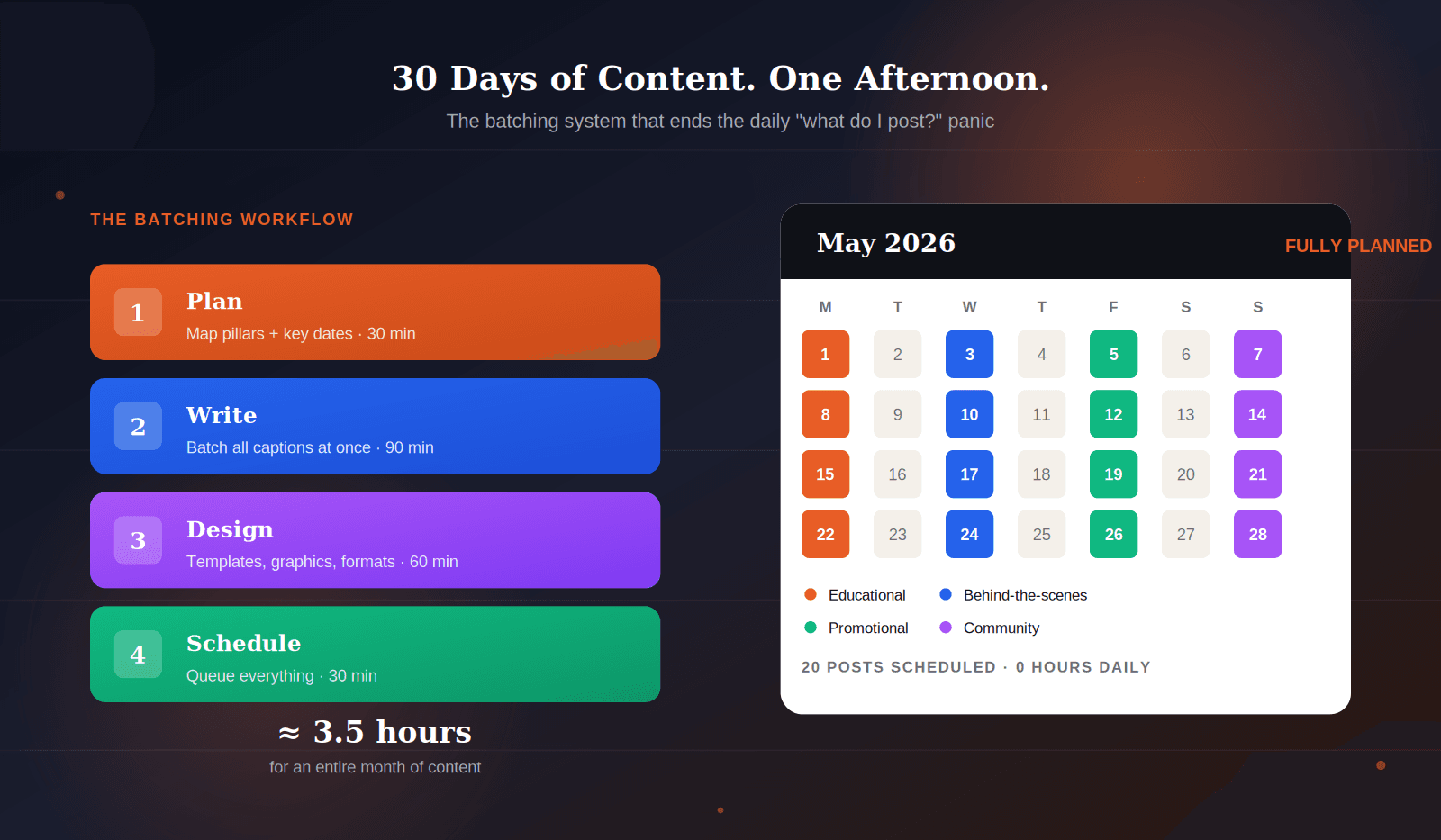
You already know you should post more consistently. That's not the problem. The problem is that posting daily requires daily decisions — what to say, what to show, which platform, what hashtags — and decision fatigue is what quietly kills most small business social media presences within three months of starting.
A content calendar fixes this at the root. It moves every decision from when you're already tired to when you have 3 hours of focused energy, and turns a 30-minute daily distraction into a 30-minute weekly review.
This guide walks you through the exact system small business owners use to plan, batch, and schedule 30 days of on-brand social content in a single focused afternoon. You'll get a four-part batching workflow, a content pillars framework that ensures variety, platform-specific posting cadences for 2026, and a practical week-one starting plan you can begin tomorrow.
No fluff. No aspirational "post every day" advice. Just the system that actually makes monthly batching sustainable.
Table of Contents
- Why Daily Posting Fails (and What Works Instead)
- The Four-Part Batching Workflow
- Content Pillars: The 4 Buckets Every Post Belongs To
- Platform Cadence: How Often to Post in 2026
- Your Monthly Batching Session, Hour by Hour
- The Weekly 30-Minute Review
- Tools That Make It Sustainable
- Frequently Asked Questions
Why Daily Posting Fails (and What Works Instead)
Most small business social strategies start the same way. You commit to posting every day. Week one goes well. Week two is harder. By week three, you're posting whatever you can come up with five minutes before closing time — and it shows.
The failure isn't about discipline. It's about the cognitive cost of creative work done under pressure. Coming up with something to post, writing it well, designing a graphic, picking hashtags, and scheduling it takes real mental energy. Doing that seven days a week, on top of running a business, is structurally unsustainable for almost everyone.
The alternative is batching — producing all your content in one focused session rather than scattered across the week. This works for three reasons. First, you eliminate the context-switching cost of starting fresh every day. Second, you maintain creative momentum instead of breaking it seven times a week. Third, you free up mental bandwidth on every other day for the actual work of running your business.
The goal is to produce 30 days of content in a single focused block of 4-8 hours.
The businesses that post consistently on social media in 2026 aren't the ones with unlimited discipline. They're the ones with systems that remove the need for daily discipline entirely. A content calendar is that system.
The Four-Part Batching Workflow
The batching workflow has four stages, done in sequence, ideally in a single afternoon. Don't mix them — switching between writing and designing is exactly the kind of context-switching that batching is meant to eliminate.
Stage 1: Plan (30 minutes)
Before you write anything, you decide what the month needs to cover. Pull up a blank calendar for the month ahead and map three things onto it: your business priorities (a launch, a sale, a seasonal moment), your key dates (holidays, industry events, anniversaries), and your content pillar mix (more on pillars in the next section).
By the end of this 30-minute block, every day you plan to post should have a content type assigned — not yet written, just categorized. "Tuesday = educational post about X." "Friday = promotional post about Y." This is your content skeleton. If you run dry on what to cover, a blog idea generator can spin a single theme into a list of content ideas you can slot straight onto the calendar.
Stage 2: Write (90 minutes)
Now you write every caption for the month in one sitting. Not one a day — all of them, back to back. This is where most of the time savings come from, because writing is the highest cognitive-cost part of the process.
The trick: write similar types of posts together. Do all your educational captions first, then all promotional, then all community, then all behind-the-scenes. Staying in one mode produces better, faster writing than bouncing between moods every 10 minutes.
If you're using AI to draft captions, this is the phase where it earns its keep. Feed it your brand voice (see our guide on brand voice for AI if you haven't set this up yet), your content pillar, your audience, and ask for 10 caption drafts at a time. Edit each one — AI gives you 80% ready, you add the final 20% of personality.
Stage 3: Design (60 minutes)
With captions written, move to visuals. Open your design tool once, set up your templates once, and produce every graphic the month needs in one block. Resize variations for Instagram feed, Stories, Reels thumbnails, and LinkedIn — the tools that let you do this quickly (Canva is the standard, but Adobe Express and Figma work too) are doing structural work for you.
A key rule: don't design from scratch for each post. Build 3-5 template variations you can reuse, then drop new photos, new headlines, and new accent colors into them. This is how professional social media teams produce hundreds of posts a month without losing their minds — and it works just as well at small scale.
Stage 4: Schedule (30 minutes)
Load everything into your scheduler — Meta Business Suite for Facebook and Instagram is free and native, Buffer and Later cover cross-platform. Drop each post on its planned day at its planned time, review the month at a glance to catch duplicate topics or awkward spacing, and you're done.
Total time: roughly 3.5 hours. For that investment, you've bought yourself an entire month of social media presence with zero daily decisions.
Content Pillars: The 4 Buckets Every Post Belongs To
Before we talk about your batching session, you need content pillars — the recurring categories that ensure your calendar has variety and strategic focus. Without pillars, batching produces 30 posts that all sound the same. With them, you get a healthy mix that keeps followers engaged across different motivations.
Most small businesses need exactly four pillars. More than that is hard to maintain; fewer creates repetition.
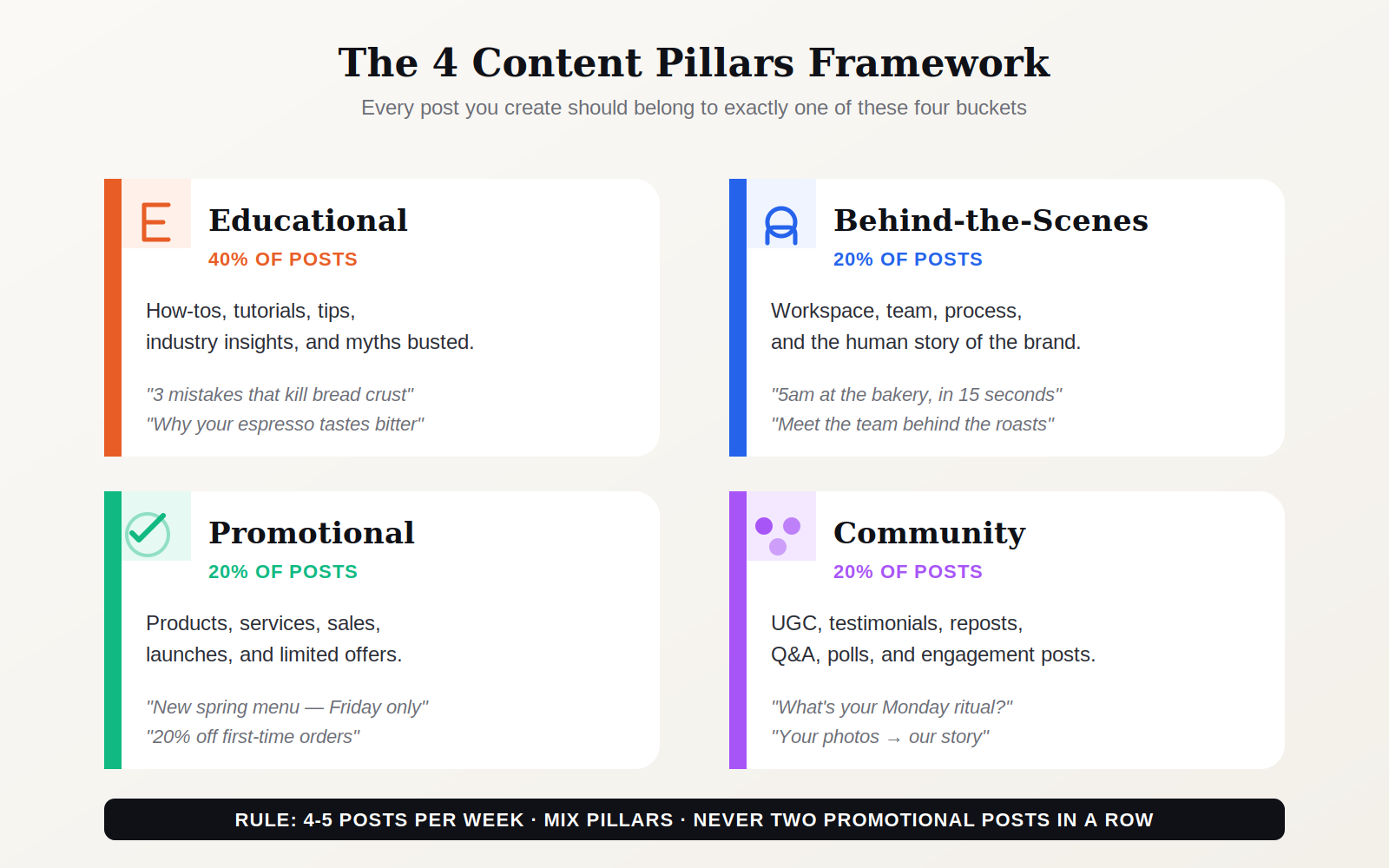 The four content pillars — every post you publish should belong to exactly one bucket.
Educational (40% of posts). How-tos, tutorials, industry insights, "3 things most people get wrong about X." This is the majority of your content because educational posts are the most shareable, most savable, and most likely to grow your audience organically. The same educational topics often double as blog posts that help you rank on Google automatically, so a single idea can earn you reach on both social and search. They also position you as the expert worth following.
Behind-the-scenes (20%). The human side of the business. Your workspace, your team, your process, a moment from the morning. Behind-the-scenes content builds emotional connection faster than any other type because it signals authenticity and specificity — proof that there's a real person behind the account.
Promotional (20%). Products, services, launches, promotions, limited offers. This is where revenue comes from, so it can't be ignored — but it also can't dominate, because audiences tune out feeds that feel like advertising. One promotional post for every four non-promotional ones is a solid baseline.
Community (20%). User-generated content, testimonials, reposts, polls, Q&As. Community content works in two directions: it shows existing customers you appreciate them, and it shows prospective customers that real humans use your product. It's also the easiest content to create because your customers already made it for you.
Rule: never schedule two promotional posts in a row. Always sandwich them between other pillars. This simple constraint alone prevents about 80% of feeds that feel too salesy.
Platform Cadence: How Often to Post in 2026
One of the biggest wins of a content calendar is resetting expectations about how much you need to post. Consistent weekly posting beats sporadic high-volume posting on every platform — and most small businesses dramatically overestimate the frequency they need.
Here's the 2026 cadence that's both sustainable and effective:
Instagram feed: 3-5 posts per week, distributed across posts, carousels, and Reels. Stories are separate — daily or near-daily on Stories is fine because the content bar is much lower.
Facebook: 3-4 posts per week. Facebook's organic reach continues to decline for most small business pages, so posting more than four times weekly produces diminishing returns unless you're pairing it with paid ads.
LinkedIn: 3-4 posts per week for personal brand accounts, 2-3 for company pages. LinkedIn rewards depth and expertise more than volume, so a well-crafted post twice a week outperforms a rushed post five times a week.
X (Twitter): daily if you're actively building, 3-4 weekly if it's a secondary channel. X is a high-volume, low-shelf-life platform — sporadic posting performs especially poorly there.
TikTok: 3-5 videos per week if it's a primary channel. TikTok's algorithm rewards volume more than any other platform, but only if the content quality holds. Better to post 3 good videos a week than 7 mediocre ones.
The key principle across all platforms: pick a frequency you can sustain without sacrificing quality, then stick to it. Dropping to "whenever I feel like it" is the fastest way to train the algorithm that your account isn't worth surfacing.
Your Monthly Batching Session, Hour by Hour
Here's what the actual 3.5-hour batching session looks like in practice. Run this in one uninterrupted block — blocking your calendar, turning off notifications, and making coffee is a legitimate part of the system.
Minutes 0-30 — The Plan
Open a blank calendar for next month. Fill in the five biggest things: any product launches or sales, any seasonal moments (Mother's Day, Black Friday, Back to School, etc.), any industry events, any personal milestones worth sharing. Then lay your content pillars across the remaining dates in the 40/20/20/20 mix.
By minute 30, every post day has a category and a rough topic. You haven't written anything yet — you've built the skeleton.
Minutes 30-120 — The Writing Block
Go pillar by pillar. Start with educational posts because they're usually the longest and most cognitively demanding. Write all 10-12 educational captions first. Then all 5-6 behind-the-scenes. Then all 5-6 promotional. Then all 5-6 community.
If you're batch-prompting AI, use the same prompt structure every time: brand voice + pillar + specific topic + platform + format. Edit as you go rather than in a separate pass — it's faster.
Minutes 120-180 — The Design Block
Open your design tool. Use pre-built templates. Drop in the final caption headlines and any photography you need. Export every post at the right dimensions for its target platform. Don't aim for perfection — aim for consistency and clarity.
Minutes 180-210 — The Schedule Block
Load everything into your scheduler. Check the month at a glance. Look for three things: posts that are too close in topic, days with nothing scheduled that should have content, and any rough transitions (educational immediately followed by a hard sell, for example). Adjust, then confirm the queue.
You're done. You have a month of content that will post itself without any further intervention from you.
The Weekly 30-Minute Review
Batching doesn't mean ignoring social media for 30 days. It means replacing daily decisions with one weekly review — typically 30 minutes, typically the same time each week (Friday afternoons work well for most people).
In that 30-minute window, you do three things:
First, review last week's performance. Which posts landed? Which didn't? What patterns are you seeing? You're not obsessing over metrics — you're gathering enough signal to inform next month's batch.
Second, respond to comments and DMs. Engagement has to happen in real time, and a batch of responses once a week is far less stressful than scattered responses every day.
Third, tweak the week ahead. Swap in a timely post if something relevant happened this week. Pull out a scheduled post if the tone no longer fits the moment. Small adjustments, not full rewrites.
💡 Pro tip: reserve one of your weekly posts as "live content" — something you write and post in real time based on what's actually happening that week. This keeps your feed from feeling pre-planned without sacrificing the efficiency of batching.
Tools That Make It Sustainable
You don't need expensive software to run this system. The tools below cover the entire workflow for free or nearly free:
Planning: Google Sheets or Notion. Both are free, both work. A simple spreadsheet with columns for Date, Platform, Pillar, Topic, Caption, Asset Link, and Status is everything you need. Fancy dashboards don't make better content.
Writing: Whatever AI tool you're comfortable with — ChatGPT, Claude, or an AI marketing platform that handles drafting with your brand voice baked in. The draft quality is less important than the editing discipline.
Design: Canva is the default for a reason. Free tier covers most small business needs. Build 3-5 templates once, reuse them endlessly.
Scheduling: Meta Business Suite handles Facebook and Instagram for free. Buffer adds LinkedIn, X, and TikTok for around €15/month on the starter tier. Both do the job.
Analytics: Platform-native analytics are usually enough. Instagram Insights, LinkedIn Analytics, Facebook Insights all give you what you need for the weekly review. Don't buy a separate analytics tool until you've mastered the free ones.
The total tool stack for this system costs €0-20/month depending on whether you need cross-platform scheduling. That's a fraction of what you'd spend hiring a freelance social media manager, and the system produces more consistent output.
Frequently Asked Questions
How long does the first batching session actually take?
Longer than 3.5 hours. The first month you try this, budget 6-8 hours — you're building templates, setting up your scheduler, defining your pillars, and learning how long each phase takes. By month three, you'll be at 3-4 hours consistently. The investment compounds.
What if I miss my batching day?
The system should survive a missed week. If you skip a batching session, you have two options: post your existing queue and backfill the last week manually, or batch two weeks at a time the next month. Don't try to "catch up" by posting double volume — that usually produces lower-quality content and undercuts the system.
How many posts should be in my monthly batch?
For most small businesses, 15-20 posts per platform is the right target — roughly four posts per week across your primary platforms. Any more and you're risking quality; any less and you're not building enough momentum for the algorithm to take notice. Start at 15, adjust based on what you can sustain.
Should I use the same content on every platform?
Adapt, don't copy. A LinkedIn post should sound different from an Instagram caption even if they cover the same topic. Length, tone, and formatting all vary by platform. Use the same theme and idea across platforms, but rewrite the copy for each. Takes 10 extra minutes and dramatically improves performance.
Can AI write my entire batch for me?
AI can draft your entire batch, but you still need to edit. The businesses getting the most out of AI content generation treat it like a smart junior writer — it produces usable drafts faster than you can write from scratch, but the final voice, specific examples, and brand personality still come from you. Skipping the edit phase is the fastest way to produce content that sounds generic.
What's the biggest mistake small businesses make with content calendars?
Overcomplicating the tracking. A content calendar should be a working document you actually use — not a 40-column spreadsheet with workflow statuses, approval chains, and performance targets. Start with 7 columns (Date, Platform, Pillar, Topic, Caption, Asset, Status). Only add complexity when the simple version is definitely insufficient.
How do I know if my content calendar is working?
Two signals. First, you're posting consistently without daily stress — if every scheduled post went out and you didn't think about social media between batching sessions, the system is working. Second, your weekly review is actually informing next month's batch — you're spotting patterns and adjusting pillars based on real performance, not just filling dates. If you have both, you've cracked it.
Keep reading
More on SEO, GEO and growing your organic traffic.
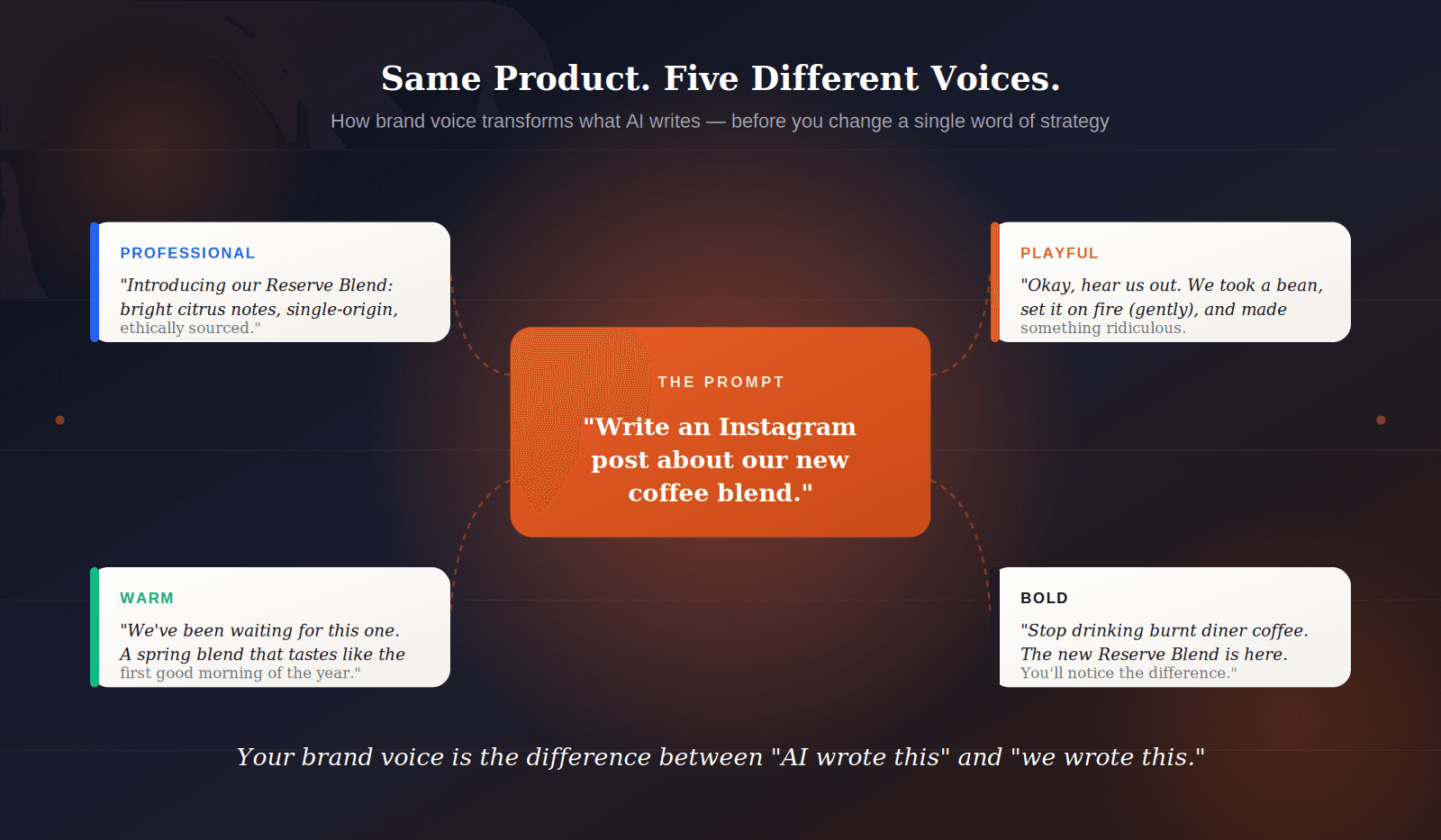
Brand Voice for AI: How to Train Your Tone Without a Style Guide
Practical playbook for defining your brand's voice in plain language so AI tools generate content that sounds like you — not like a chatbot. Five tone archetypes and a 10-minute setup.
Read article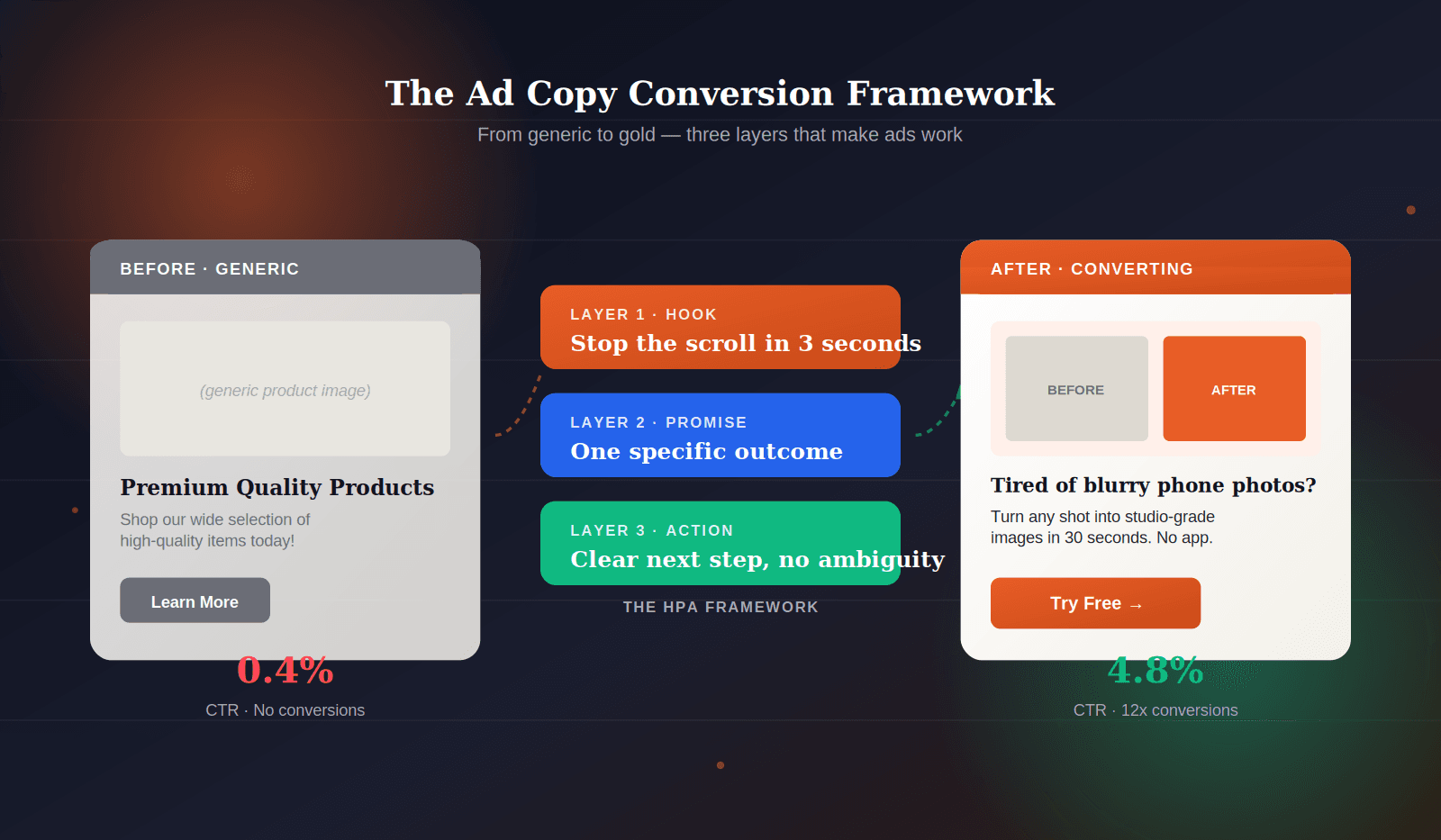
AI Ad Copy That Converts: The 2026 Framework for Small Businesses
A repeatable structure for writing Facebook and Google ad copy that actually earns clicks — headline formulas, CTA patterns, and the three tests every ad should pass before you spend a single euro.
Read article
AI Marketing Automation for Small Businesses: The Complete 2026 Guide
How business owners are using AI to generate a full week of social posts, ad copy, and emails in under a minute — and why you should too.
Read articleReady to rank? Start free today.
Put your SEO on autopilot. No credit card, no installations — ready in 2 minutes.